Getting started with Keepresso

Keepresso is a native macOS menu-bar app that keeps your Mac awake on your terms. It is free, open source, and runs on macOS 14 or newer. This guide gets you from download to your first keep-awake session in a minute.
Requirements
- A Mac running macOS 14 (Sonoma) or newer.
- Permission to install apps.
1. Install Keepresso
Two ways, whichever you prefer. Both give you the signed, notarized app, and it keeps itself up to date from there.
Homebrew (one command):
brew install --cask gyorgysh/keepresso/keepresso
Or download the DMG from the releases page, open it, and drag Keepresso into your Applications folder.
Keepresso is not on the Mac App Store, on purpose: the App Store sandbox blocks the macOS power APIs it needs to keep your Mac awake. It is signed and notarized by Apple, so it opens normally.
2. Open it
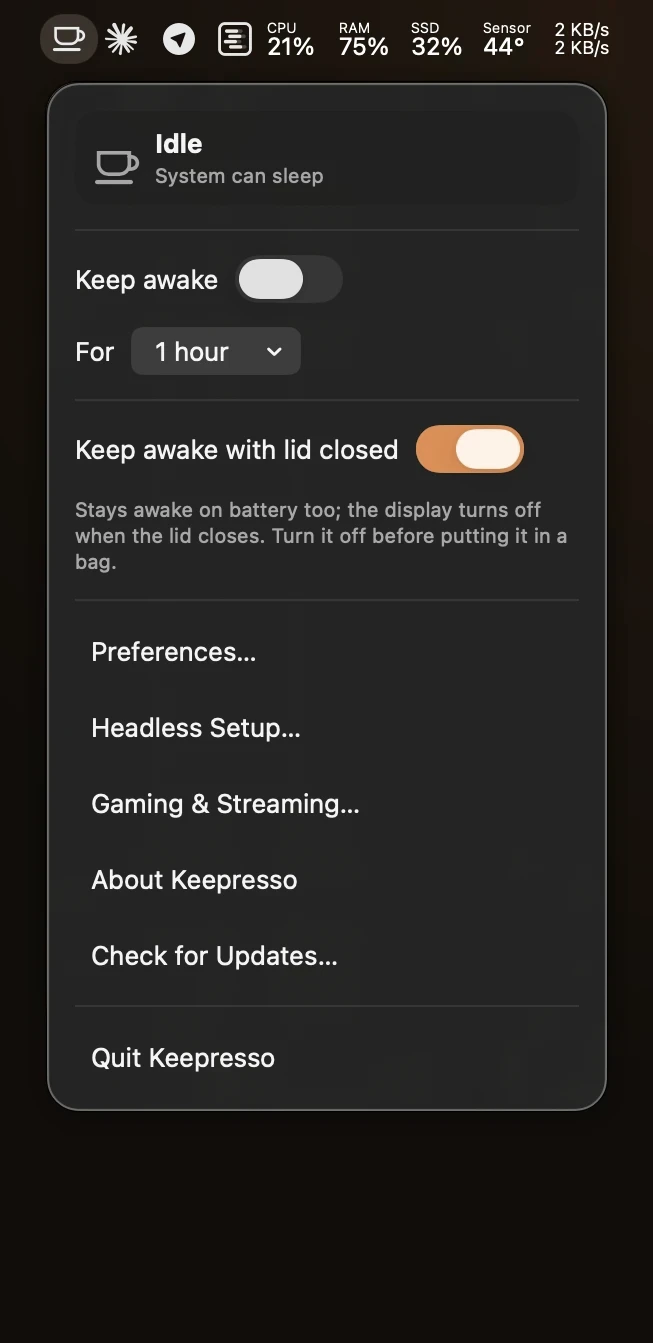
Launch Keepresso from Applications. Once it starts, its cup icon appears in the menu bar. Keepresso has no Dock icon on purpose: it lives entirely in the menu bar.
3. Start a session
Click the menu-bar icon and turn keep-awake on. Your Mac now stays awake until you turn it off or a timer you set runs out. That is the whole idea: your Mac stays up while you need it, and sleeps normally when you do not.
Next steps
- Set a timer so a session ends on its own: Keep awake for a set time.
- Keep working with the lid shut: Keep your MacBook awake with the lid closed.
- Only stay awake when something is actually running: Smart triggers.
- Running AI agents or scripts on this Mac? Let them hold it awake safely with automation leases.
Get Keepresso
Free and open source, for macOS 14 and newer. Install it and keep your Mac awake on your terms.
More in Getting started