Let AI agents keep your Mac awake with automation leases

An agent that runs a long job overnight needs the Mac awake while it works, and asleep when it is done. A plain "keep awake on" gets the first half and fails the second: if the tool crashes or forgets to turn it off, the Mac stays pinned awake forever. Automation leases fix that. A script or an AI agent acquires a lease with a time limit, keeps renewing it while the work runs, and releases it at the end. If the tool dies mid-job, the lease simply expires and the Mac can sleep again. Nothing is left holding the machine up by accident.
Keepresso ships the whole stack for this: the keepresso lease commands, an MCP server any MCP-capable agent can call, and a bundled agent skill you can install in one click.
Detection watches, a lease speaks
Keepresso already has an AI agent trigger that detects when a coding agent is actually working. Known agents include Claude, Cursor, Codex, Gemini, Grok, Antigravity, Hermes Agent, Kilo Code, OpenCode, DeepSeek Harness, LM Studio Bionic, pi, Kimi Code, Qwen Code, Muse Code, Devin CLI, and more. Tools without a deeper connection are judged by evidence from their process or conversation store, and that side needs no setup in the agent at all.
Connect Claude Code, Cursor, Codex, Antigravity, or Grok under the AI agent condition when you want exact session state. Conversations are tracked separately, including chats inside desktop apps that share one host process, so an idle conversation does not inherit another conversation's work and a missed stop does not hold the Mac awake for the life of the app. Only tools actually installed on your Mac are offered, and Keepresso rechecks each connection over time, repairing a hook that went missing or fell out of date.
But detection can only cover the agents Keepresso knows how to recognize, and new ones appear every week. A lease flips the direction: instead of Keepresso guessing, the agent itself tells Keepresso when it needs the Mac awake, for what, and for how long, then keeps proving it is still alive. Any tool that can run a command or call an MCP server can do it, no matter the name, and however it works inside. The two compose nicely: detection covers the everyday sessions you did not think about, leases cover the deliberate long jobs and everything detection cannot see.
Codex detection and hook installation both follow CODEX_HOME, including a custom directory. Connecting Codex requires you to approve new hooks in Codex. From 1.27, Keepresso repairs its existing SessionEnd hooks to avoid timeouts and removes an unsupported Cursor hook while preserving your own hooks and remaining activity reporting.
Why a lease instead of keepresso start
keepresso start is a fine manual switch, but automation wants different guarantees:
- Bounded. A lease has a TTL the owner must keep renewing, and a maximum lifetime (capped at 7 days) that heartbeats can never extend. A runaway job cannot hold the Mac awake past its ceiling.
- Self-healing. No heartbeat, no hold. A crashed script's lease expires on its own.
- Shared cleanly. Several tools can hold leases at once. Keepresso unions them and lets the Mac sleep after the last one ends, running your end-of-session action then, not before.
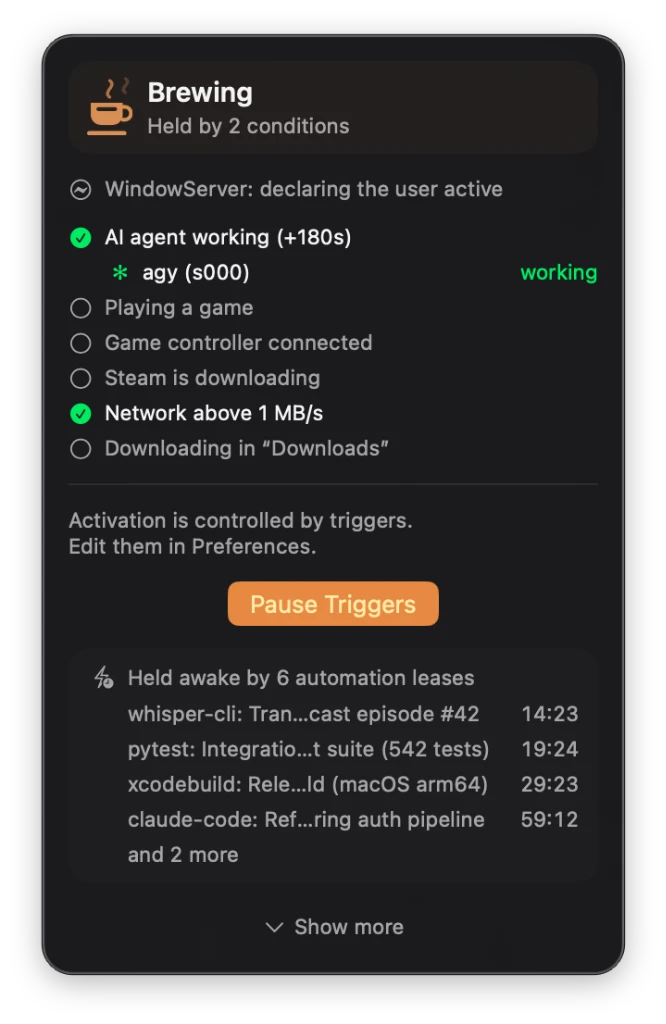
- Visible. Every live lease shows in the menu with its countdown, named after the tool and task that took it.
The lease lifecycle
Acquire a lease when the job starts. You pick the id (a UUID), name the tool and the task, and set the TTL in seconds:
ID=$(uuidgen)
keepresso lease acquire --id "$ID" --tool my-script --task "nightly render" --ttl 600
Heartbeat before half the TTL elapses, on a loop for as long as the work runs. A heartbeat can also adjust the TTL:
keepresso lease heartbeat --id "$ID"            # renew with the same TTL
keepresso lease heartbeat --id "$ID" --ttl 300  # renew and shorten it
Release when the job is done, so the Mac does not wait out the rest of the TTL:
keepresso lease release --id "$ID"
And list what is live, yours and everyone else's:
keepresso lease list --json
Every command takes --json for machine-readable output, and the exit codes are made for scripts: 0 ok, 2 the app is not running, 3 the lease was not found or already ended, 4 leases are switched off in Preferences.
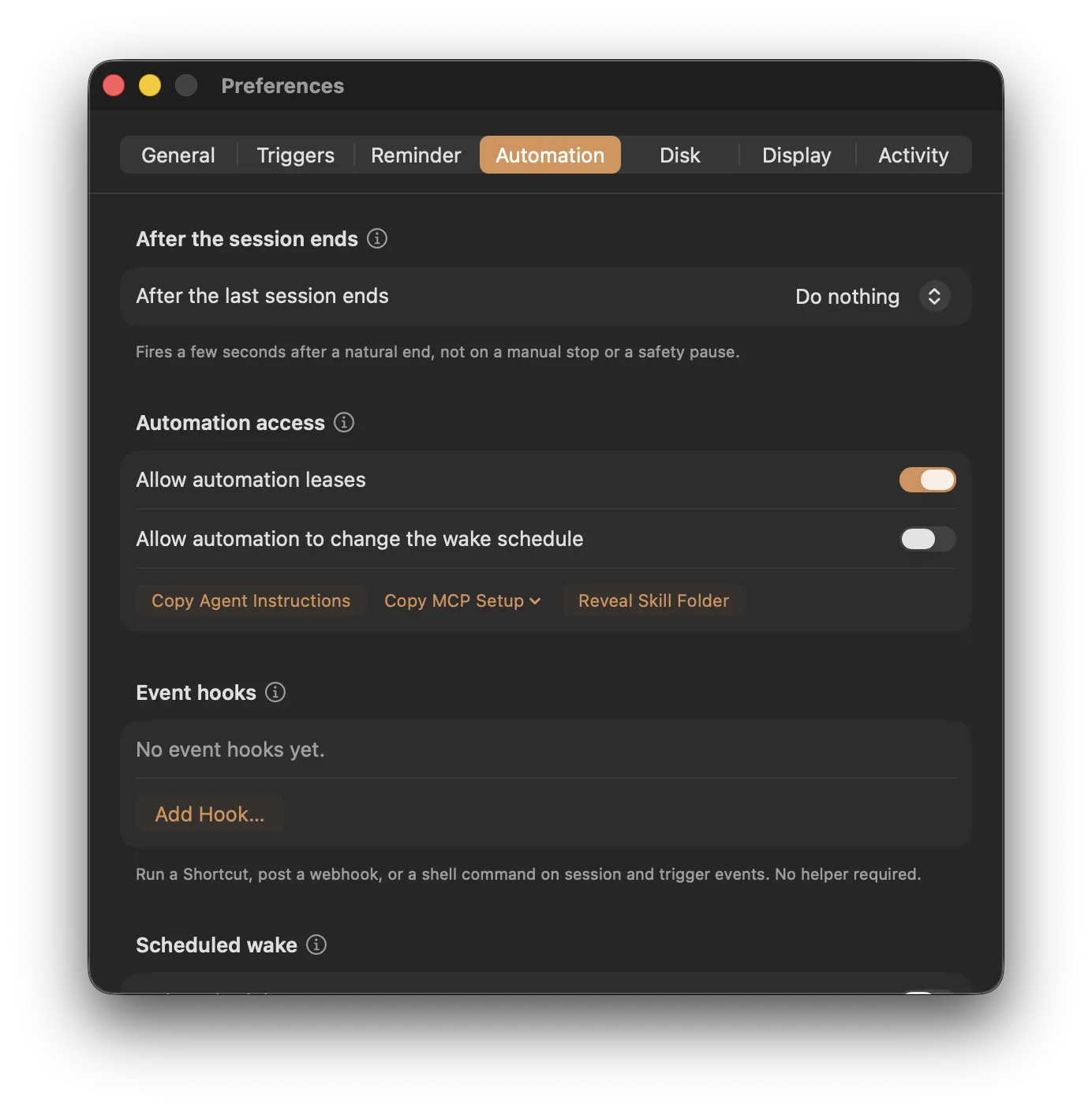
Leases are governed by a switch under Preferences, Automation, on by default. Turn it off and every acquire is refused with exit code 4, so automation can never override your choice.
See and stop them from the menu
Live leases appear in the menu panel's status card with a countdown each. You stay in charge: Stop ends them all at once, and the Mac is free to sleep again.
Teach your agent in one click
You do not have to explain any of this to your agent by hand. The app bundle ships a ready-made keep-awake skill that teaches an agent the whole protocol, both the keepresso command line and the MCP server, plus when to use it: before a long build, render, download, or overnight run. Under Preferences, Automation, install it straight from disk into your agent's skills folder. For agents without one, Keepresso copies the full skill as paste-ready instructions instead: paste them into the agent once and the protocol is learned, or save them into a global config file your agent always reads, such as CLAUDE.md or AGENTS.md, so every future session already knows how and when to hold the Mac awake. The skill also lives in the bundle at Keepresso.app/Contents/Resources/AgentSkill/keep-awake if you would rather wire it up yourself.
The MCP server
For agents that speak the Model Context Protocol, the bundle ships keepresso-mcp:
/Applications/Keepresso.app/Contents/Helpers/keepresso-mcp
It exposes tools to acquire, heartbeat, release, and list leases, read Keepresso's status, and read the system wake schedule. MCP is an open protocol, so this is not limited to coding agents: any MCP-capable app can hold its own lease and keep the Mac alive while it works. Preferences, Automation has setup snippets ready to copy for Claude Code, Gemini CLI, Grok, and Codex. For Claude Code it comes down to one command:
claude mcp add keepresso -- /Applications/Keepresso.app/Contents/Helpers/keepresso-mcp
Wake schedules for automation, opt-in
Automation can also read when the system is next scheduled to wake, and, if you allow it, change that schedule:
keepresso wake status                          # always allowed, for anyone
keepresso wake set --at "2026-07-24 07:30"     # one-shot wake
keepresso wake set --repeat MTWRF --time 07:30 # repeating wake
keepresso wake clear
Reading is always allowed. Changing the schedule works only while Allow automation to change the wake schedule is on under Preferences, Automation. It is off by default, because a scheduled wake is a system-wide change applied by the administrator helper. The MCP server carries the matching tools under the same rule.
Wake the Mac for scheduled AI runs
Leases and the CLI cover work that is already running. But some agent work is scheduled for later: a Claude Desktop routine set to run at 3am, a Codex automation on a nightly cadence, or a tokenstat.ai job that needs this Mac. If the Mac has drifted to sleep by then, the run is simply skipped.
Scheduled AI runs closes that gap without any scripting. Turn it on under Preferences, Automation, Scheduled AI runs, then switch on each tool you want woken for. Keepresso reads the recurring tasks that tool has scheduled, wakes the Mac a few minutes before each one, and holds it awake for a short window so the run happens even with the lid shut.
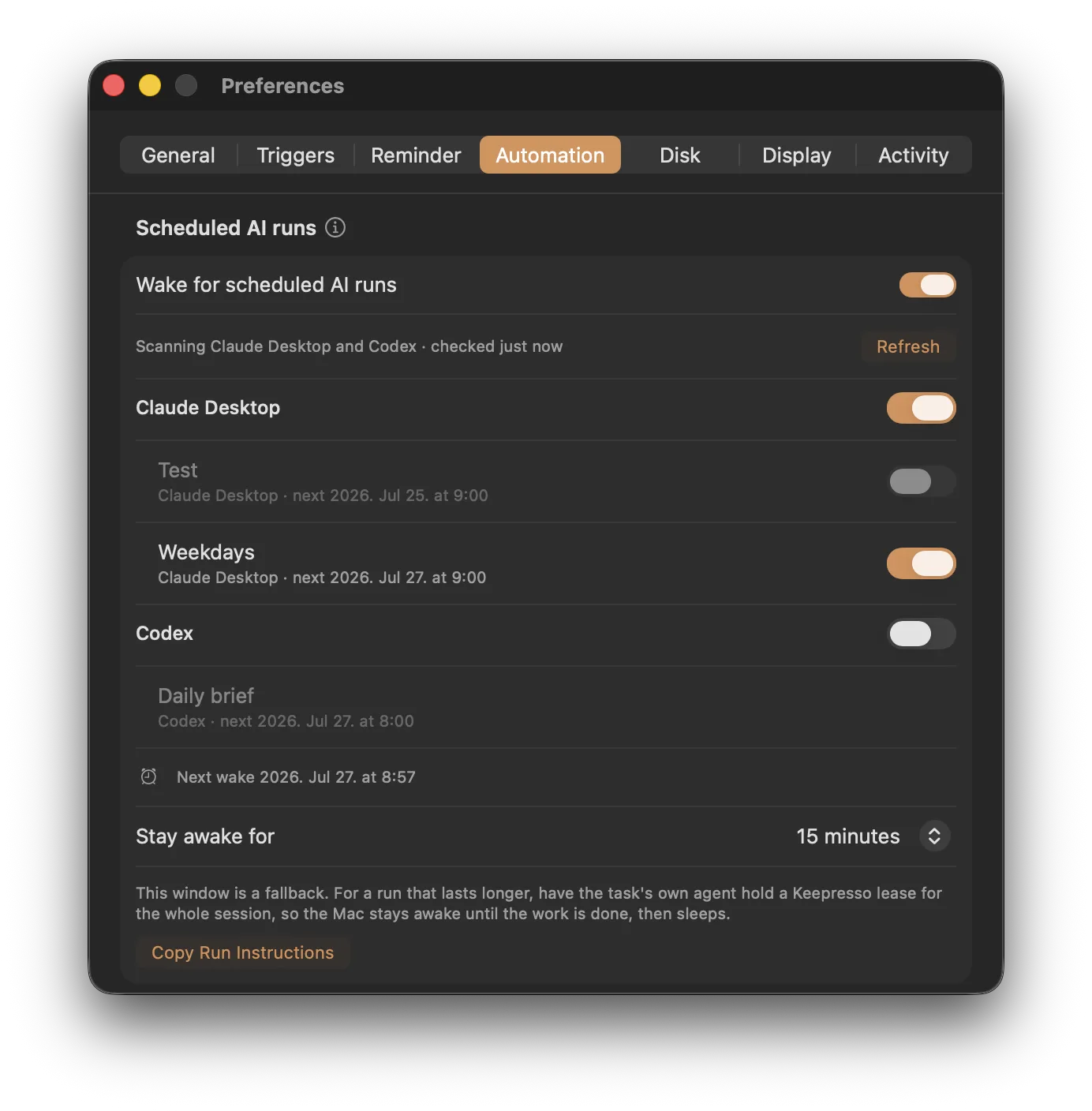
Nothing is imported until you turn a tool on, and every routine keeps its own switch, so you can wake for the nightly report and ignore the rest. If the list comes up empty, the tool has no local recurring task yet.
- You opt in per platform. Claude Desktop, Codex, and tokenstat.ai each start off, so nothing you do not use is ever woken for. Keepresso reads only the schedule and the task's name, never its prompt.
- Local schedules only. Cloud routines run on the vendor's servers even if your Mac is asleep, so those are ignored. This is for the runs that need your Mac up.
- For a longer run, pair it with a lease: the wake window gets the run started, and the agent holds a lease to keep the Mac awake until the work actually finishes.
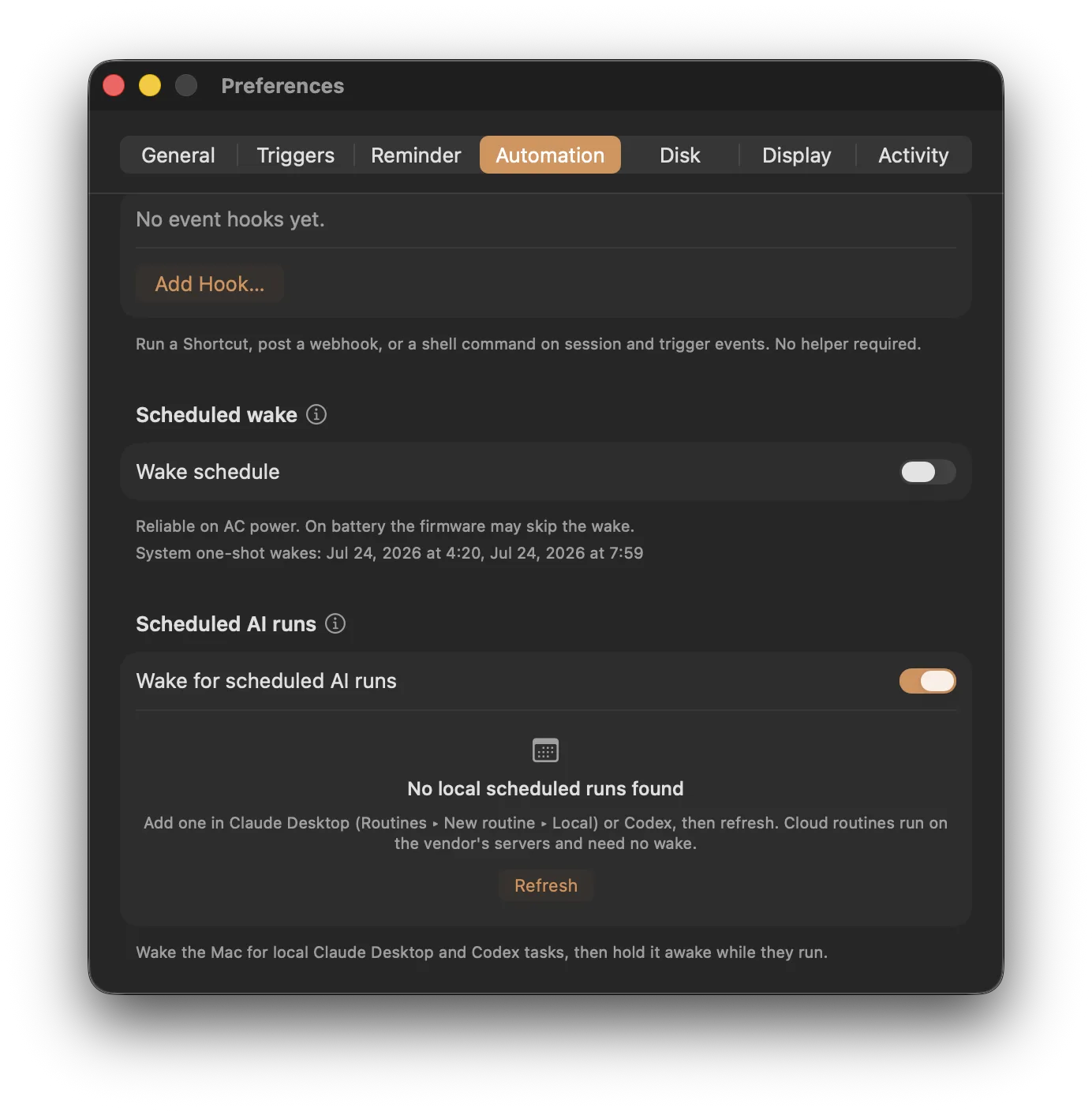
Under the hood it uses the same scheduled-wake machinery as the CLI's keepresso wake commands above, so it needs the administrator helper and is reliable on AC power (on battery the firmware may skip the wake).
Repeating wakes follow the chosen local clock time across daylight-saving changes. Invalid dates are rejected. Use 1.25 or newer for these corrections.
What you need
- Keepresso 1.17 or newer for leases, the MCP server, and the CLI wake commands; 1.18 or newer for Claude Desktop and Codex Scheduled AI runs; 1.21 or newer for tokenstat.ai jobs and the expanded agent detection. Install steps: getting started.
- For the CLI on a DMG install, link the command once.
- For wake-schedule changes and Scheduled AI runs, the administrator helper and the opt-in switches above.
Related
- Keep your Mac awake from the command line covers the rest of the
keepressoCLI. - Keep your Mac awake during long builds shows the trigger-based approaches for jobs you run yourself.
- Running agents on an always-on Mac? MyAgens gives it a crew of Claude Code agents you command from Telegram.
Get Keepresso
Free and open source, for macOS 14 and newer. Install it and keep your Mac awake on your terms.
More in Using Keepresso