Keep a headless Mac mini or Mac Studio awake
A Mac mini or Mac Studio tucked away as a home server, build machine, or agent host has one job: stay up and stay reachable. Out of the box, macOS is tuned for a laptop on someone's desk, so it sleeps, waits at login screens, and does not always come back after a power cut. Keepresso's Headless Setup checklist walks you through fixing that.
Open the checklist
In Keepresso, open the Headless Setup checklist. It probes your Mac and marks each item ready, a warning, or a tip, with a link straight to the right System Settings pane or a command you can copy. It only reads your settings; it never changes anything without you.
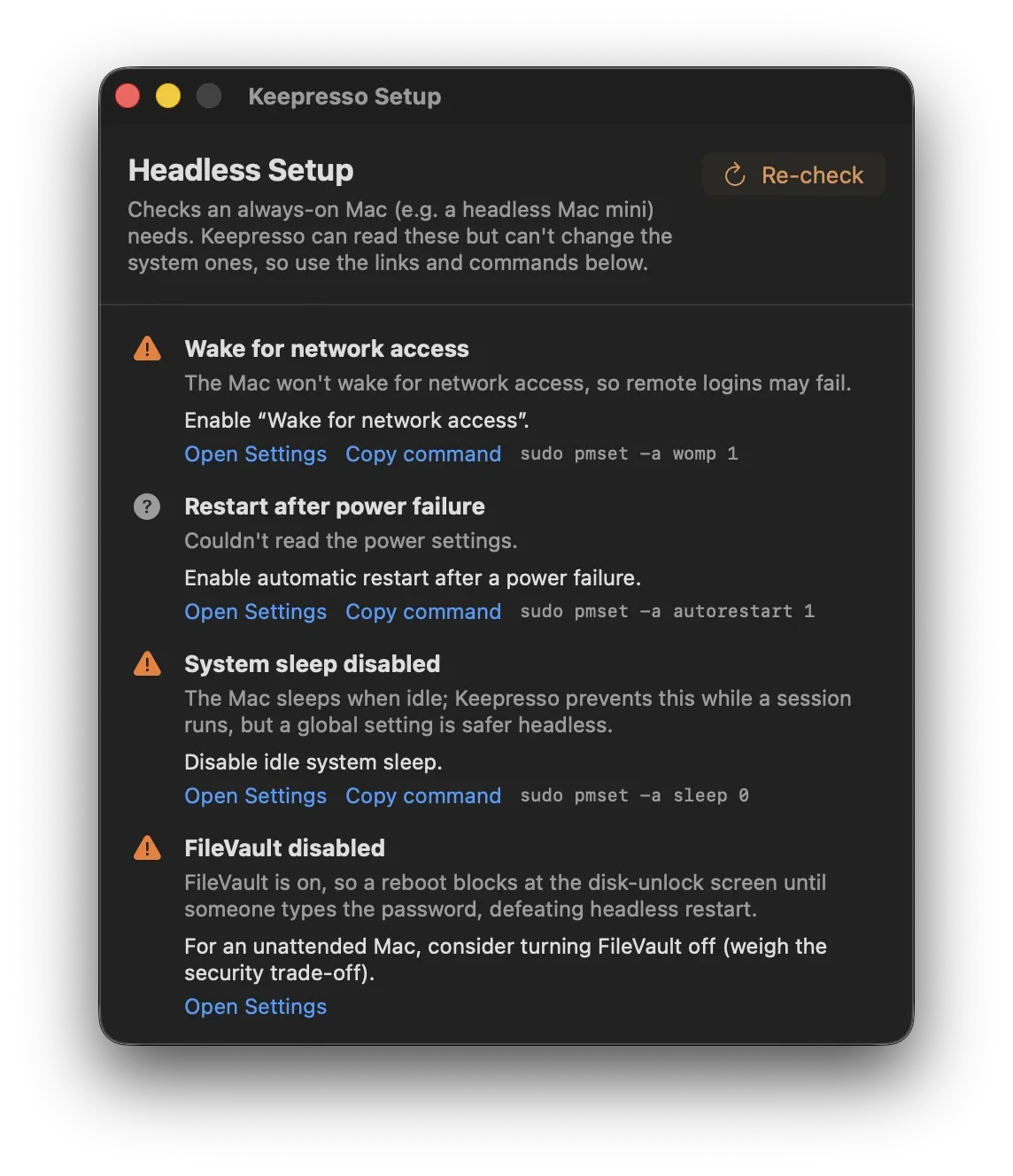
What it checks, and why each matters
- System sleep off. So the Mac never drops off the network mid-job. Suggests
sudo pmset -a sleep 0. - Wake for network access. So it responds to a connection instead of ignoring it. Suggests
sudo pmset -a womp 1. - Restart after a power failure. So a blip or outage does not leave the Mac off until you drive over to press the button. Suggests
sudo pmset -a autorestart 1. - Automatic login. So after a reboot it reaches the desktop on its own, rather than sitting at the login window where nothing is reachable.
- FileVault. A warning, not a rule: FileVault is great for security, but it stops an unattended Mac at the disk-unlock screen after a reboot, before login or the network come up. For a truly hands-off headless machine, that is the tradeoff to understand.
- Remote Login (SSH) and Screen Sharing. Shown as tips, so you can reach the Mac once it is up.
Keeping it awake with the lid or without a screen
- On a Mac mini or Studio there is no lid, so a keep-awake session (or simply system sleep off) is all you need.
- On a MacBook acting as a server, use lid-closed mode so it keeps running with the lid shut, on battery or power, with the screen off.
Wake it on a schedule
If the Mac is allowed to sleep between jobs, it needs to be up before the work starts. Under Preferences, Automation, Keepresso can install a one-shot or repeating system wake through the administrator helper, then start a keep-awake session when the Mac actually wakes, or leave your triggers in charge, so an overnight job does not lose the race to idle sleep. On a desktop Mac on AC power the wake is reliable; a laptop on battery may see the firmware skip it.
Scripts can read the schedule too: keepresso wake status works for anyone, and keepresso wake set / clear can change it once you switch on Allow automation to change the wake schedule in the same tab (off by default).
Reaching it crisply over Screen Sharing
A headless Mac with no monitor hands you a fuzzy, low-resolution desktop over Screen Sharing. Keepresso can fix that without a dummy plug: see Fix blurry Screen Sharing on a headless Mac.
Running agents on it?
If this always-on Mac is going to run AI agents, MyAgens gives it a crew of Claude Code agents you command from Telegram, and Keepresso's AI Agent preset keeps the Mac awake while they are actually working, then lets it sleep once every session goes idle. An event hook can ping your phone the moment an agent goes idle, so you know an overnight run finished without checking in.
The agents can hold the Mac awake themselves too, safely: automation leases are bounded grants an agent keeps renewing while it works, with a bundled skill and an MCP server that teach it the whole protocol in one click.
Get Keepresso
Free and open source, for macOS 14 and newer. Install it and keep your Mac awake on your terms.
More in Headless & remote